Mailsloth: Serverless mailing list service
On my everlasting quest to do find easier ways to do things, I decided to learn how to use Azure Functions to build an application. I decided to build a simple email subscription form that you can copy and paste onto your website to start collecting emails. Ths app will allow a user to:
- Register and receive a set of API keys.
- Copy and paste a few snippets of HTML onto their website to help them collect emails.
- Download a list of the collected emails from a HTTP endpoint.
Simple. You can have a look at the finished result here.
Azure Functions & Table Storage
We’re going to be using a pair of services from Azure, Microsofts cloud platform.
Azure Functions give you a way to upload snippets of code into the cloud that are run in response to events such as HTTP requests or database inserts. You are billed for the compute time you use and don’t have to worry about scalability.
Table Storage is a simple persistent key-value storage service that allows you to cheaply store large amounts of JSON data. Lookups are performed using a two-tuple of a Partition Key and a Row Key.
The App
We need three API end points:
/createwill create a new mailing list, save the users email and send them the information they need to download the list later./addwill add a new subscriber to a mailing list./retrievewill securely give the creator of the mailing list a way to download their subscribers emails.
We’ll also need a client side slug of javascript that will load the form and make the required API calls.
Creating the API Endpoints with Azure Functions
Get started by following this guide to create your first function app.
A Functions App is a collection of one or more Functions. Each Function consists of:
- A a function or method implemented in a programming language such as C#, Node JS, or Powershell.
- A
function.jsonfile containing information about how the function binds to its environment, including input bindings that trigger the function and output bindings that allow the function to trigger actions in other applications or services.
In this project, I used C# and wrote the code using the web portal text editor.
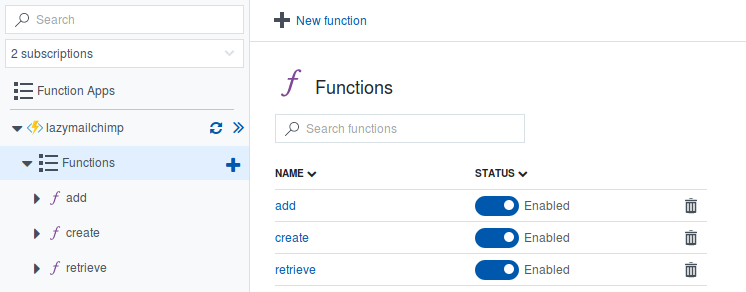
The end result looks like this in the dashboard:
Create endpoint
Each Function is represented by a single method in a C# script file. The method signature of the create endpoint function looks like this:
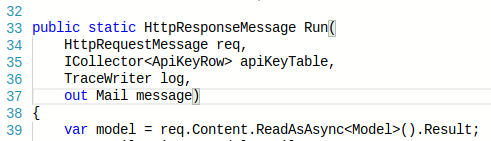
The function expects a response of type HttpResponseMessage and takes an instance of HttpRequestMessage as its first parameter. It also gives you an instance of TraceWriter for logging.
What you also notice is that it gives you an instance of ICollector<ApiKeyRow> and expects an out parameter of type Mail. These provide two different ways for you to return additional objects from your function besides the methods return object. This is because, besides just generating an HTTP response, this function also:
- Creates an email message to be sent to the user and;
- Creates an instance of
ApiKeyRowto be saved into table storage.
I’m unsure if I need to use an out parameter here, and suspect that I could just use two ICollector interfaces instead, which would be nice because it would allow me to write this method as fully async.
The emailing functionality is handled by the seamless SendGrid integration.
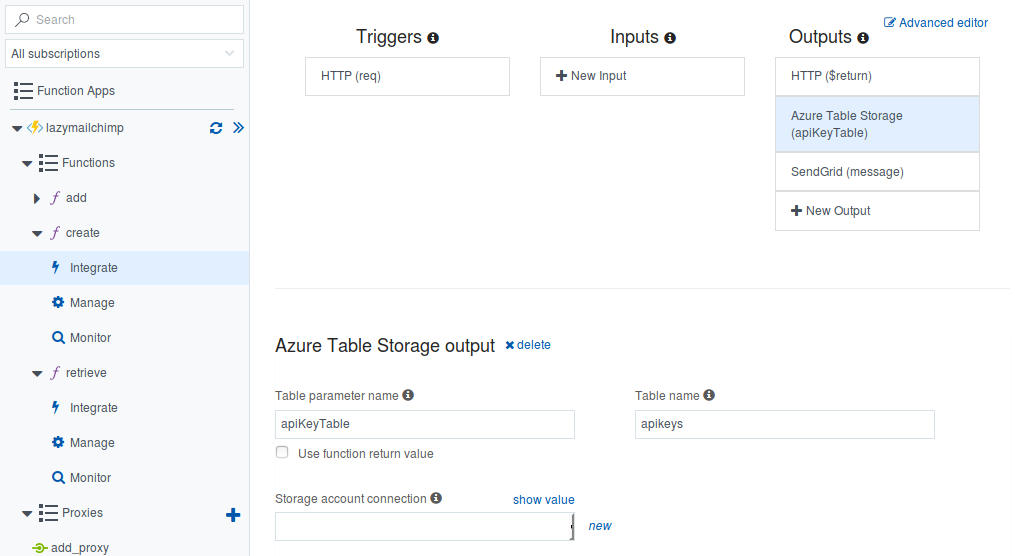
These additional output parameters are configured in the function.json file that accompanies this particular function. Here it is:
{
  "bindings": [
    {
      "authLevel": "anonymous",
      "name": "req",
      "type": "httpTrigger",
      "direction": "in"
    },
    {
      "name": "$return",
      "type": "http",
      "direction": "out"
    },
    {
      "type": "table",
      "name": "apiKeyTable",
      "tableName": "apikeys",
      "connection": "...",
      "direction": "out"
    },
    {
      "type": "sendGrid",
      "name": "message",
      "apiKey": "...",
      "from": "noreply@mailsloth.net",
      "direction": "out",
      "subject": "mailsloth.net - API Keys"
    }
  ],
  "disabled": false
}
Each binding represents either an input or an output. In this case, we are setting up two additional outputs alongside the HTTP bindings. The infrastructure deals with the details of instantiating the appropriate objects and passing them to the method as parameters at run time. The configuration of these details is made easier by the Integrate configuration tab which gives you a GUI to configure these bits and pieces:
The object that we are going to save into TableStorage, ApiKeyRow, is a an object that represents the meta data we need to store to be able to retrieve an email list.
public class ApiKeyRow
{
    // This will be the private API key
    //  used to retrieve email lists.
    public string PartitionKey {get; set;}

    // This will be the email address
    //  of the list creator
    public string RowKey {get; set;}

    // This will be the public ID used
    //  when adding a subscriber.
    public string PublicKey {get;set;}
}
As mentioned above, Table Storage requires two pieces of information to be able to return an item: the PartitionKey that is used to shard the data, and the RowKey which uniquely identifies a record on a particular shard.
In order to be able to secure a users email list, we create two api keys - a ‘public’ key is used to identify the email list when a new subscriber wants to be added to it. A ‘private’ key is used to lookup the email list and download its contents. Here, we are setting the PartitionKey to the private key and the RowKey to the email address of the creator. When a user does a retrieve call and provides their private key, we will use that to do a lookup to see if a record exists under that key. More details on that shortly. If we do find a record, we can then get the PublicKey associated with it and use that to do a range lookup for all of the subscriber emails associated with that email list.
The rest of this function isn’t that interesting - some validation before creating an instance of ApiKeyRow and Mail and returning Ok.
Add endpoint
The add pattern follows the same pattern as above - deserialize the request body from the HttpRequestMessage before validating and creating a simple object to store in Table Storage:
public class AddressEntity
{
    public string PartitionKey {get; set;}
    public string RowKey {get; set;}
    public string Authority {get; set;}
}
Here we’re setting PartitionKey to be the public Id of the mailing list that the subscriber is trying to subscribe themselves to. The RowKey will be the subscribers email address.
Retrieve endpoint
This is where we allow a user to get a list of the email addresses that have subscribed to their mailing list. It’s worth having a look at the function signature to get a sense of how we’re going to be querying Table Storage:
public static async Task<HttpResponseMessage> Run(
    HttpRequestMessage req,
    IQueryable<AddressEntity> addressesTable,
    IQueryable<ApiKeyRow> apikeysTable,
    TraceWriter log)
{
The Functions infrastructure provides us with two IQueryable instances, one for each of the Table Storage collections that the application requires. These are configured in the accompanying function.json file and give us a way to query our Table Storage collections.
The GET request contains a query parameter that specifies the “Private” key of the email list. We first match this to the “Public” key of the email list by doing a lookup of the metadata table using some LINQ:
var publicKey = apikeysTable
  .FirstOrDefault(r => r.PartitionKey == key)
  ?.PublicKey;
We check that this value exists, and if so do a lookup of our second Table Storage collection, addressesTable to retrieve our email values. Table Storage allows you to do range lookups by partition key, and this is how we retrieve them.
var emails = addressesTable
    .Where(a => a.PartitionKey == publicKey)
    .Select(a => new {Email = a.RowKey, Url = a.Authority})
    .ToList();
These values can then be returned in the HTTP response. A future improvement for these might be to see if we can do it using non-blocking IO, but as far as I know it wont affect how much our function costs to run, as even non-blocking compute time is included when calculating how long a function took to run.
Proxies
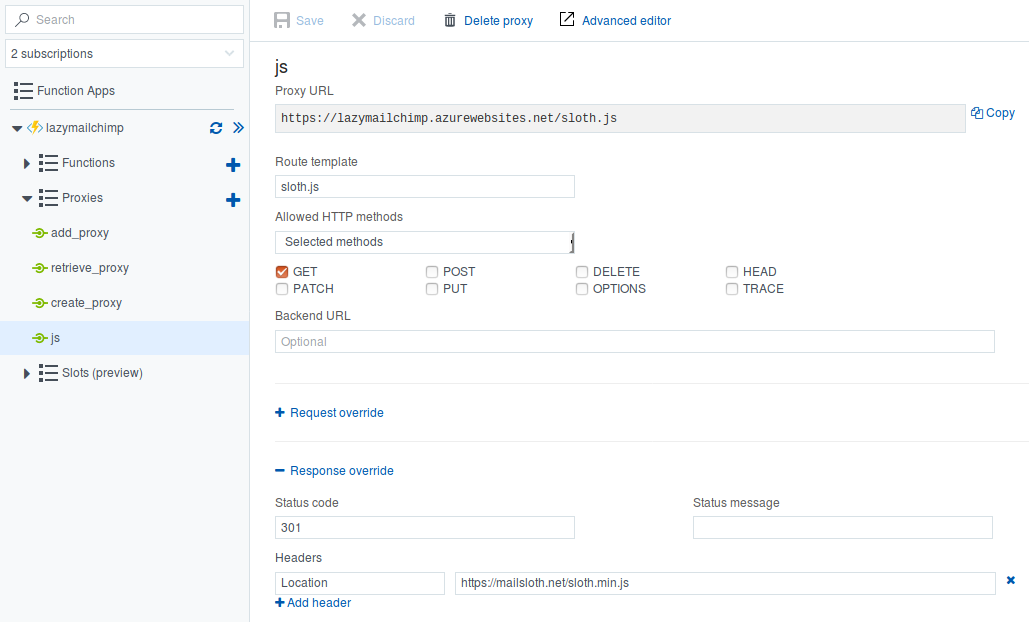
A useful feature is Proxies, which allow you to manipulate how your application responds to certain HTTP routes. In this project, I used it to create an additional URL endpoint that redirects to the JavaScript payload required by the client to submit new emails to their email list. By delivering the JavaScript payload from the same host that you then send API calls to, you avoid a few issues with cross origin policies.
The configuration for this little hack looks like this:
Front end
I haven’t really detailed what went into the front end as it’s not really that interesting. Feel free to go to mailsloth.net and have a poke around if you are interested or want to (heaven help you) use the service.
Conclusion
It’s getting easier and easier to throw a functional application together. Not to say that this one would be enterprise-ready. Nonetheless, “Serverless” products like Azure Functions still feel a bit like something that is only really suited to small, unimportant bits of code. This isn’t helped by the overall opaqueness of the resulting system.
But it is important to remember that this is a young, fledgling idea and we’re only really beginning to explore what tools like these can offer us. I’d love to meet or hear from anyone who has built big, critical bits of their backend infrastructure off of the back of a Serverless product. I have a feeling that such a person might be difficult to find for the foreseable future.