Generate modern C# code with Intellisense Mnemonics
“I choose a lazy person to do a hard job. Because a lazy person will find an easy way of doing it.”
Someone.
Ok, so writing simple classes, methods and properties might not be particularly hard, but as a C# Dev, you do write an awful lot of them on a day to day basis. It is against this backdrop of barely excusable laziness that I decided to spend some time learning about the Visual Studio Intellisense shortcuts that JetBrains made available in a project called Mnemonics.
Mnemonics is a program that creates loads of additional code templates that you can import and access from intellisense. Instructions on how to import the templates are included in the repository, linked above.
After you have installed it, if you type c in a C# file, an option will come up in intellisense:

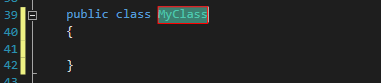
On pressing tab, the following template will be generated:
Here’s another example for generating a property:
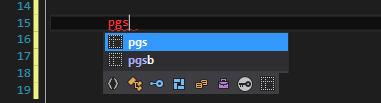
‘pg’ will generate a getter only property and the ‘s’ will make it a type of string:
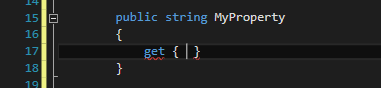
The Mnemonics program generates over 600 of these shortcuts, allowing you to generate instance and static classes, interfaces, structs and members, including properties, methods and fields.
Mnemoics2
But the original project hasn’t been updated for a few years and doesn’t include some of the newer, frequently used C# constructs, such as asynchronous methods and extension methods. It also includes some templates that don’t work properly - for example, the template shortcut to generate a static method that returns a list of strings is:
Ml.s
But the usage of a full stop stops the intellisense from completing properly.
After having a look through the source code I decided to take a stab at making a few improvements to the original code. The result is Mnemonics2. As well as adding support for extension methods and async methods, I also changed some of the original shortcuts to make intellisense complete correctly as well as modifing the choice of basic types. I also added a bit more flexibility to the shortcuts by allowing you to generate a stub of code without the return type filled in, allowing you to easily use custom return types.
Below I’ve documented how the shortcuts look now, but the basic idea is the same - you begin by specifying what structure you want. If it is a member structure (methods, properties, fields), you can optionally add characters indicating what return type you want.
Structure types
The basic structure types that you can generate are unchanged from the original Mnemonics project. They are classes (instance, static and abstract), interfaces, structs and enums.
| Construct | Shortcut |
|---|---|
| Instance class | c |
| Static class | C |
| Abstract class | a |
| Interface | i |
| Struct | s |
| Enum | e |
For methods, you can now optionally add an a for an async method that doesn’t return a value, or A for one that does:
| Construct | Shortcut |
|---|---|
| Instance method | m |
| Static method | M |
| Async method, no return value | ma |
| Async method, return a value | mA |
| Async static method, no return val | Ma |
| Async static method, return a val | MA |
| Extension method | X |
| Async extension method, no return val | Xa |
| Async extension method, return val | XA |
So ma would generate:
public async Task MyMethod()
{

}
And mAs would generate:
public async Task<string> MyMethod()
{

}
Basic types
Next, you can optionally specify the return type by appending the appropriate character sequence. The shortcuts for non generic types are:
| Shortcut | Type |
|---|---|
| Float | f |
| Boolean | b |
| Byte | by |
| Integer | i |
| Decimal | m |
| String | s |
| Guid | g |
| Task | t |
| DateTime | dt |
So to create a method that returns a string, use the shortcut ms. This would expand to:
public string MyMethod()
{

}
I’ve deliberately only included what I reckon are the most used ones. This means a few types that were included in the original project have been removed. Open an issue if you think something is missing that should be there.
Generic types
Generic types can be used as return types by using one of the capital letter shortcuts below, optionally followed by the letter of the basic type that you want to use as the type parameter.
| Type | Shortcut |
|---|---|
| List |
L |
| T[] | R |
| Task |
T |
| IEnumerable |
E |
So to generate an async extension method that returns an enumerable of strings you would use XAEs which would give you the following template:
public static async Task<IEnumerable<string>> MyMethod(this T val)
{
    |
}
By tabbing through you will be able to fill out the method name, parameter type and body in turn.
Custom return types
However, quite often you want to return a custom type from a function instead of one of the basic types. You can fill in your own custom return type by simply leaving off the letter / letters indicating the return type. The shortcut m will create a method that, by default, has a void return type. Tabbing through the template will give you the opportunity to change void for something else.
public void MyMethod()
{

}
This logic also works for generic types. For example, the mnemonic mE would create a template for an instance method that returns an IEnumerable of something, and tabbing through will enable you to fill in the return type followed by the body:
public IEnumerable<T> MyMethod()
{
    |
}
Here is an example for generating a static async method with a custom return type using the mnemoic MA:
public static async Task<T> MyMethod()
{
    |
}
Properties
Properties aren’t that different from the original project. Generate using the p prefix. To get a read-write string, use ps:
public string MyProperty { get; set; }
To generate a public-get private-set property of type list of guids, the shortcut prLg would generate the following template:
public List<Guid> MyProperty { get; private set; }
Fields
It can also generate ordinary fields using v. For example, the code for an array of ints would be vRi which generates:
private int[] myValues;
Add an r for a readonly field. To generate a readonly Task of result string, you would use vrTs:
private readonly Task<string> myValue;
This project is still fairly experimental, but you can find it here. If you want to discuss anything, open an issue or yell at me on Twitter.
Have fun - and may all your code be forever more procedurally generated.